VOXX · YOUR RUNNING WEEK
A half marathon training app for your running week
Bring your goal, recent training and available time into one plan review. VOXX shows what fits now, including when a foundation phase comes before a half-marathon build.
Private iPhone beta · Invitation through Apple TestFlight
Explore iPhone beta access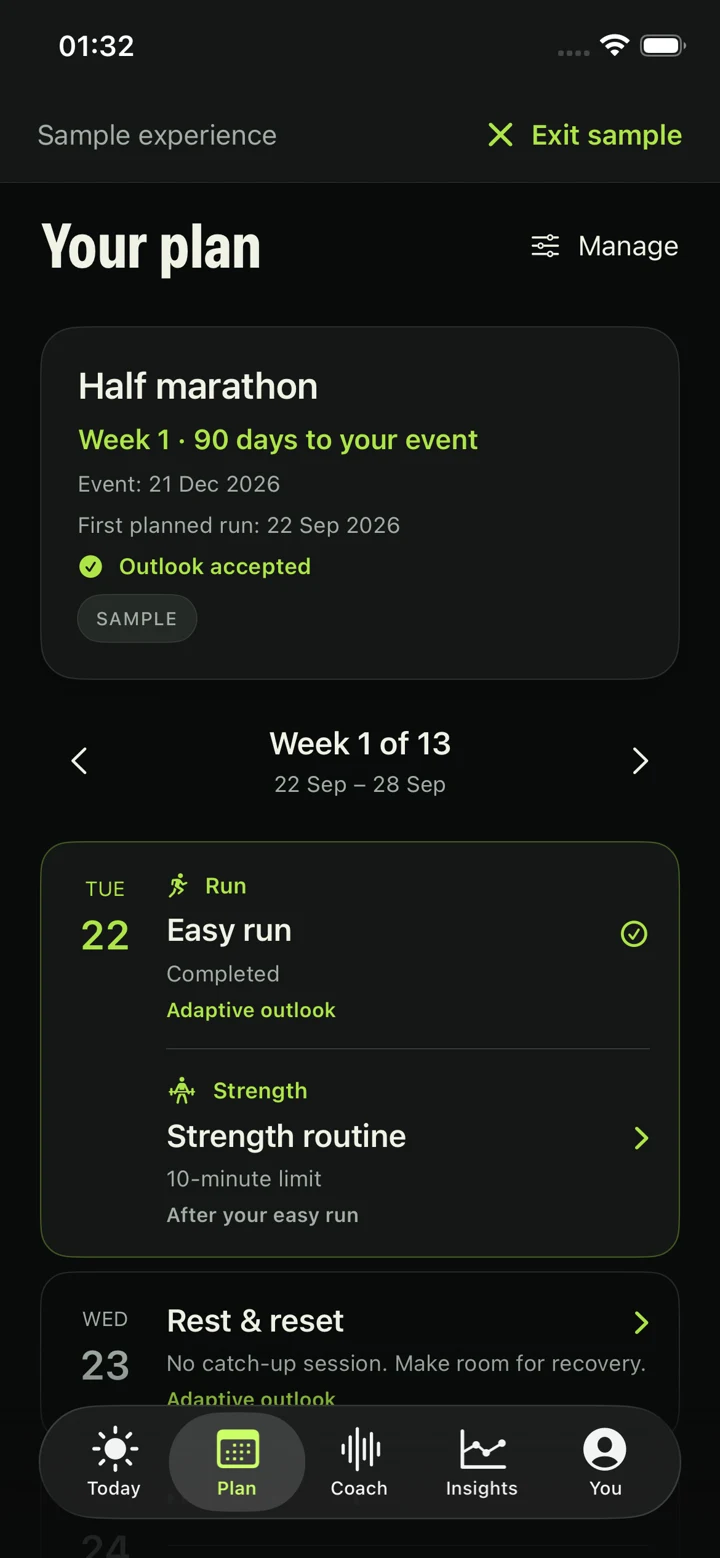
01 · A GOAL WITH CONTEXT
Set the goal and the time you have
Choose Work toward Half marathon in setup. Add an event date if you have one, or continue without a date. Choose the days you can run, a preferred longer-run day, and time limits for usual and longer sessions.
Those limits describe calendar space. They do not establish your current capacity or require every session to fill the available time. Recent running, health answers and recovery still shape the preview.
Check the setup summary before opening the preview. Your first proposed run has a date, total duration, effort, structure and purpose. Nothing enters Plan until you accept.
Walk through first-plan setup · Understand the plan review and acceptance process.
02 · THE STARTING POINT MATTERS
A half-marathon goal can start with a foundation
VOXX’s half-marathon build requires an established, confirmed recent running history, enough preparation time and room for the longer sessions. Your own estimates can support a cautious foundation, but do not by themselves establish eligibility for a race build.
If the current history, available days or longer-run time do not support the build, the preview explains the foundation phase. A nearby race does not make VOXX compress missing preparation into the remaining weeks.
ILLUSTRATED COMPARISON · NOT A TRAINING PRESCRIPTION
History incomplete
A runner selects Half marathon but knows some runs are missing. They review imports or use an estimate. The preview can begin with a foundation.
Build supported
Confirmed recent running and the available schedule can support a goal-specific build. The runner still reads the actual sessions and limits before accepting.
Race approaching
An event date gives the plan a timeline. Selecting it does not prove readiness or override insufficient preparation. The runner reviews the stated limits.
These examples describe different app decisions, not fitness tests or guarantees of event readiness. The sample screen’s timeline is illustrative.
No date yet is fine. Race-specific phases and tapering need an event date. Weekly reviews keep that date fixed unless you choose to change it.
03 · READ THE ACTUAL SESSIONS
Know what the week asks of you
Time and effort
Review easy running, the longer session and rest in the accepted calendar. Session totals include warm-up, main work, recoveries and cool-down.
Controlled work when it fits
Controlled sessions are optional and depend on history, recovery, phase and time limits. Enabling the option does not guarantee a harder session.
Optional strength
Preview introductory strength alongside the running week. Accepted routines have their own instructions, feedback and completion records.
If you have reviewed a usable personal pace reference, eligible sessions can show pace guidance. Otherwise they use effort guidance. Choosing Half marathon alone does not produce a predicted finish time.
The accepted session’s timer and spoken cues guide its steps. Check how you feel before starting, then record effort and pain afterward so the next review has current context.
Explore guided sessions · See the optional strength workflow.
04 · KEEP THE CALENDAR HONEST
Review the next weeks as life changes
In Plan → Manage plan, Review next 4 weeks brings together available recorded training, current feedback and proposed changes. Later weeks stay provisional. New imports do not silently replace an accepted calendar.
Use Change this week for a temporary availability change. Preview the affected dates and any strength changes, then accept only if the proposal fits. A requested move can be ruled out by the plan’s limits.
If a run looks missing, check its record and import status first. A past skip does not become an extra session, and an interruption does not automatically move your event date. You can keep the current plan, accept eligible changes or pause for a longer break.
See schedule changes and plan pauses · Review a missed-run decision · Put recovery scores and check-ins in context.
05 · CHOOSE WITH THE LIMITS IN VIEW
Who this beta fits
VOXX can fit adult runners who want to inspect a half-marathon plan, follow its sessions and review changes as their circumstances evolve. Access is by invitation through Apple TestFlight on iPhone with iOS 18 or later. A wearable is optional.
The app does not certify race readiness, predict a finish time, replace an individual professional programme or guarantee injury prevention. The professional-coach approach requires your coach to review each preview. Injury-related return follows a separate workflow.
Just beginning? The beginner running page explains run/walk starting points. Event preparation helps organise practical details, with its own limits.
PRIVATE IPHONE BETA
Put your half-marathon week in view.
Request a place in the VOXX iPhone beta. Access is by invitation through Apple TestFlight. An iPhone running iOS 18 or later is required; a wearable is optional.
Request the half-marathon betaA short form. The team will email you about availability and next steps. A request does not create an account or guarantee access.